For creators looking to start recording audio on a computer, understanding the core principles of digital audio is the first step. A recent guide from MusicRadar on MSN breaks down what happens “inside the box” during computer-based recording, offering a clear entry point for beginners. The resource focuses on foundational knowledge without assuming prior technical experience, making it ideal for those new to audio production.
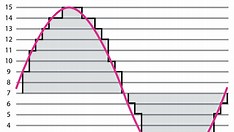
The guide explains how analog sound is converted into digital data through an audio interface, a critical component for quality recording. It covers the role of sample rate and bit depth in determining audio fidelity, helping creators make informed choices when setting up their software. These concepts are vital for anyone recording vocals, instruments, or podcasts on a PC or Mac.
It also touches on the signal flow from microphone to computer, emphasizing how proper gain staging prevents distortion and noise. By demystifying the digital audio workflow, the article empowers creators to troubleshoot common issues and optimize their setup. This knowledge is especially valuable for independent creators building home studios on a budget.
While the summary does not detail specific software or hardware recommendations, it establishes a strong conceptual base. Creators can use this foundation to explore digital audio workstations (DAWs), plugins, and recording techniques with confidence. The focus remains on understanding the process rather than promoting specific products.
Ultimately, the guide serves as a practical starting point for creators aiming to produce professional-sounding audio using just a computer. By grasping the essentials of digital audio, they can avoid common pitfalls and focus on their craft. This approach supports long-term growth in music, podcasting, voiceover, and other audio-driven content fields.
Join the conversation
Load Facebook comments to read and reply using your Facebook account.
