When recording tutorials, livestreams, or voiceovers, adjusting background music volume can disrupt focus if you have to navigate on-screen menus. A common scenario creators face is noticing audio imbalance mid-recording—like music overpowering narration—and instinctively opening the volume slider, which breaks concentration and appears unprofessional on camera. This interruption not only affects the creator’s flow but can also distract viewers if captured in the frame.
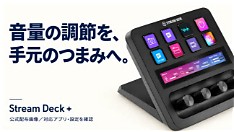
Instead of relying on software-based volume controls that require mouse movement or touchscreen interaction, many creators are turning to tactile solutions like the Elgato Stream Deck with rotary dials. These physical dials allow real-time, hands-on adjustment of audio levels without looking away from the camera or breaking stride. By assigning volume controls to dedicated dials, creators can make subtle, precise changes while maintaining eye contact and delivery—critical for engaging content.
The Stream Deck ecosystem supports deep integration with popular audio and video software, including OBS Studio, Adobe Audition, and DaVinci Resolve, enabling customizable shortcuts for gain, mute, or monitor mix adjustments. Unlike generic controllers, its dials offer smooth, analog-like response ideal for fine-tuning music beds or mic levels during live sessions. This setup reduces reliance on visual feedback loops, letting creators trust muscle memory rather than hunting for sliders on screen.
For solo creators managing multiple roles—host, producer, engineer—this workflow efficiency translates into fewer retakes and more consistent output quality. The ability to adjust audio on the fly without breaking performance is especially valuable in long-form recordings, podcasts, or educational content where tone and pacing matter. As production demands grow, tools that minimize cognitive load and maximize presence become essential.
Ultimately, choosing hardware-assisted controls like Stream Deck dials isn’t just about convenience—it’s about preserving creative momentum. By keeping adjustments off-screen and within reach, creators stay immersed in their message, delivering smoother, more professional results without the distraction of digging through interfaces mid-take.
Join the conversation
Load Facebook comments to read and reply using your Facebook account.
