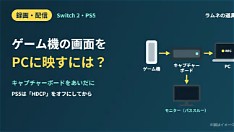
If you're trying to get your Nintendo Switch 2 or PlayStation 5 gameplay onto your computer screen via an HDMI cable, you may have noticed nothing happens when plugged into your PC’s port. This isn’t a malfunction—it’s expected behavior. Most consumer-grade laptops and desktops feature HDMI outputs designed solely to send video signals *from* the PC to external monitors—not receive them from devices like consoles. As a result, attempting to feed console output directly into a PC’s HDMI input yields no image, leaving many creators frustrated during setup. To properly capture and display console gameplay on a PC, a dedicated solution is required: an external USB video capture card. These compact devices act as intermediaries, accepting HDMI input from your Switch 2 or PS5 and converting it into a data stream your computer can recognize via USB. Once connected, software such as OBS Studio, Streamlabs, or manufacturer-provided apps can detect the feed, allowing you to view, record, or broadcast your gameplay in real time. The process begins by linking the console’s HDMI output to the capture card’s input using a standard HDMI cable. Then, connect the capture card to your PC through a USB 3.0 or higher port for optimal bandwidth and low latency. After installing any necessary drivers or launching your preferred streaming application, select the capture device as a video source. If the feed doesn’t appear immediately, troubleshooting steps include verifying the capture card is set to the correct input mode, ensuring the console is outputting a supported resolution (like 1080p at 60Hz), and checking that USB bandwidth isn’t being shared with too many other devices. For creators focused on producing high-quality content—whether for Twitch, YouTube, or social clips—using a capture card remains the reliable, industry-standard method to bridge console gaming and PC-based production workflows without compromise. Always verify compatibility with your specific console model and operating system before purchasing hardware.
Join the conversation
Load Facebook comments to read and reply using your Facebook account.