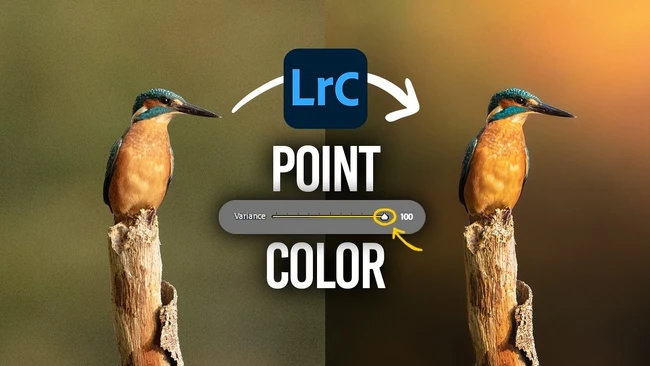
A sharp subject set against a flat, uniform background often lacks visual impact, even when exposure and focus are perfect. This common issue leaves images feeling dull or lifeless, particularly when the backdrop is a single wash of tone like brown or gray. Creators frequently face this challenge in portrait, product, or lifestyle photography where background detail is minimal but mood matters.
Adobe Lightroom’s Point Color tool offers a targeted solution. Within this feature, the Variance slider controls how broadly or narrowly a selected color range is affected. By adjusting Variance, creators can either tighten the color selection for precision or expand it to influence a wider spectrum of tones in the background. This allows for subtle yet effective enhancements—introducing slight shifts in hue, saturation, or luminance—to break up monotony without altering the subject.
The tool works by sampling a specific color area and then letting users modify its properties while controlling spill via Variance. Increasing Variance adds nuance to the background, simulating natural texture or depth through color variation rather than relying on clarity or dehaze sliders that might affect edges. This method preserves subject integrity while giving the backdrop a more dynamic, layered feel.
For content creators aiming to streamline post-production, this approach delivers fast results without complex masking or layer work. It’s especially useful when shooting against seamless paper, fabric walls, or outdoor settings with limited color diversity. Rather than reshooting or applying heavy presets, a quick tweak to Variance can restore visual interest and professional polish.
As editing efficiency becomes critical for meeting client demands and content schedules, tools like Point Color empower creators to solve common problems intuitively. The ability to revive a flat background with a single slider adjustment exemplifies how thoughtful software design supports both technical quality and creative expression—turning technically correct images into visually compelling ones.
Join the conversation
Load Facebook comments to read and reply using your Facebook account.