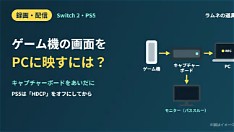
Connecting modern gaming consoles like the Nintendo Switch 2 or PS5 directly to a PC’s HDMI port won’t display video, as most PC HDMI outputs are designed for sending signals out, not receiving them. To view or record console gameplay on a computer, creators must use an external capture card that acts as a bridge between the console’s HDMI output and the PC’s USB or PCIe interface. This setup enables real-time monitoring, high-quality recording, and seamless integration with streaming software such as OBS Studio or Streamlabs.
For optimal performance, choose a capture card that supports at least 1080p resolution and 60 frames per second, with low-latency passthrough to avoid delay during live play. Ensure the device is compatible with your operating system and has proper drivers installed—many models require specific software from the manufacturer to function correctly. Once connected, plug the console’s HDMI output into the capture card’s input, then link the card to your PC via USB or internal slot, depending on the model.
If the console screen fails to appear on your PC after connection, troubleshoot by checking cable integrity, verifying the capture card is powered (if external), confirming correct input/output labeling, and testing the HDMI signal on a TV or monitor first to rule out console issues. Updating firmware and reinstalling drivers often resolves detection problems. Creators should also ensure their PC meets the minimum processing demands for smooth capture, especially when recording at higher resolutions or frame rates. Proper configuration turns a standard PC into a powerful content hub for console-based creators.
Join the conversation
Load Facebook comments to read and reply using your Facebook account.