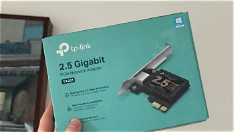
Often overlooked, the PCIe x1 slot on modern motherboards offers quiet, low-power expansion ideal for creators building compact or upgrade-friendly workstations. While it doesn’t support graphics cards, this slim interface is perfectly suited for specialized add-ons that enhance productivity without draining power or generating excess heat. For video editors, audio engineers, and live streamers, strategic use of the x1 slot can mean smoother workflows and fewer bottlenecks.
Common upgrades include USB 3.0 or USB-C expansion cards, which add fast data transfer ports for external SSDs, cameras, or audio interfaces—critical for creators handling large media files. Others opt for dedicated NVMe controllers to add high-speed storage without sacrificing SATA ports, enabling faster project loading and rendering. Some even use the slot for low-latency network cards to ensure stable uploads during live streams.
These solutions are typically affordable, easy to install, and draw minimal power—making them ideal for small form factor builds or secondary systems used for content backup and encoding. Because they operate at lower bandwidths than x16 slots, they won’t interfere with GPU performance, allowing creators to multitask efficiently.
By rethinking what the humble PCIe x1 slot can do, creators can future-proof their setups with targeted, cost-effective enhancements. Whether you’re refining a streaming rig or expanding a editing workstation, this underused slot offers practical value—no major overhaul required. The key is matching the upgrade to your specific creative bottleneck, turning silence into speed.
Join the conversation
Load Facebook comments to read and reply using your Facebook account.
