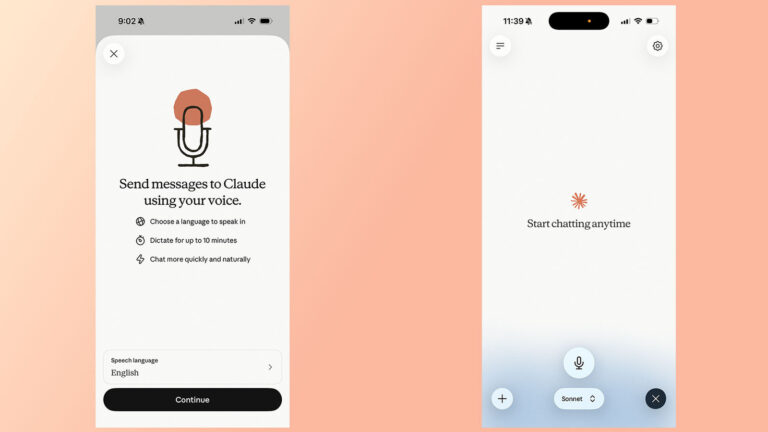
Anthropic’s Claude chatbot now offers a voice mode that can produce audible responses when users want them, according to an Engadget guide published on August 9, 2026. The article titled “How to use Claude’s voice mode” walks readers through the steps to turn the feature on and off, highlighting that the chatbot can be “very vocal” if desired.
The guide explains that activating voice mode is done within Claude’s interface, typically by toggling a setting that switches text‑only replies to spoken output. Once enabled, Claude’s replies are delivered through the device’s speaker or connected headset, allowing users to hear the AI’s responses without reading them on screen.
For content creators, this capability opens several practical avenues. Hands‑free interaction lets creators brainstorm ideas or request outlines while filming, editing, or managing other tasks. Voice output can also serve as a quick way to generate narration scripts for videos, podcasts, or audio‑only content, reducing the need to type and then read aloud. Additionally, creators focused on accessibility can use the spoken responses to produce alternative formats for audiences who prefer or require audio information.
To integrate voice mode smoothly into a workflow, creators might test the feature in a low‑stakes environment first, checking audio clarity and latency. Using a quality headset or external speaker can improve intelligibility, especially in noisy settings. Adjusting the volume and ensuring a stable internet connection help maintain consistent performance during live streams or recording sessions.
While the voice mode adds a new dimension to AI‑assisted creation, creators should remain mindful of how they use the output. Reviewing the generated spoken content for accuracy and tone before publishing ensures it meets brand standards. As with any AI tool, experimenting with the feature and adapting it
Join the conversation
Load Facebook comments to read and reply using your Facebook account.
