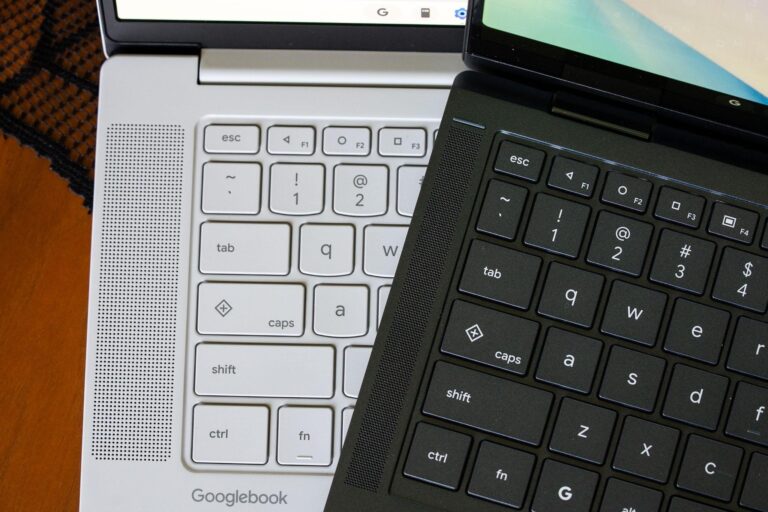
Googlebooks has reintroduced physical navigation buttons that closely resemble those found on Android devices from 2014, sparking renewed interest among content creators who rely on efficient workflow tools. Despite online speculation that the Quick Insert and Google logo keys are recent additions, they actually debuted a few years ago on select Chromebook models. What’s new is how these keys are now integrated into Googlebooks’ hardware design, drawing direct inspiration from Android’s-era navigation systems.
This move signals a subtle but meaningful shift in how Google is unifying its hardware ecosystem across devices. For creators who frequently switch between tablets, laptops, and Chromebooks, consistent physical controls can reduce friction in daily tasks like inserting media, launching search, or navigating apps. The return of tactile navigation may also appeal to users who prefer haptic feedback over purely touch-based or gesture-driven interfaces.
While the source doesn’t detail exact specifications or pricing, the implication is clear: Google is refining Googlebooks as a serious productivity tool for creators by borrowing proven interaction patterns from its mobile platform. By aligning Googlebooks’ input methods with familiar Android conventions, the company aims to create a more intuitive, seamless experience—especially for those already embedded in the Google ecosystem.
For content creators focused on speed and reliability, this evolution could mean fewer workflow interruptions and a more predictable device response. As Google continues to blur the lines between its ChromeOS and Android experiences, features like these may become standard across future devices, reinforcing Googlebooks’ role not just as a laptop, but as a bridge between mobile and desktop creativity.
Join the conversation
Load Facebook comments to read and reply using your Facebook account.
